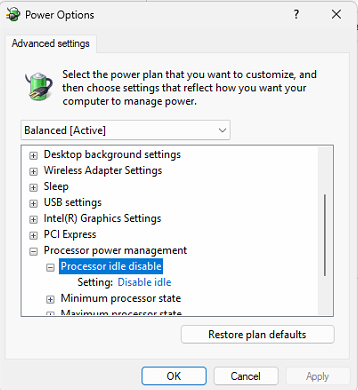
This article is not about fixing CPU fan noise. It’s about a relatively quiet variable sound that comes from the CPU that can vary from a buzzing to a hissing to a screeching sound depending on who you ask. It’s relatively quiet and it’s caused by the CPU being idled by the operating system. Here’s how to quiet it down:
- Open Regedit
- Locate: HKEY_LOCAL_MACHINE \ SYSTEM \ CurrentControlSet \ Control \ Power \ PowerSettings \ 54533251-82be-4824-96c1-47b60b¬740d00 \ 5d76a2ca-e8c0-402f-a133-215849¬2d58ad
- Change Attributes from 1 to 0.

- Then, through the power control panel, there will be an option to disable idle processor. Set this to Disabled.