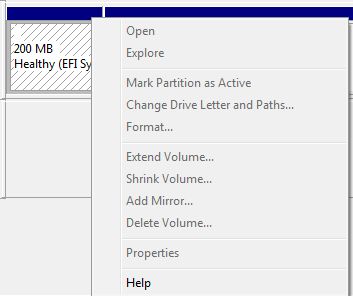
So I bought myself an external 1TB USB hard drive the other day. The idea was to use it for backups on my MacBook, but later I decided to use it on a PC instead. Since I had initially formatted the drive in OS X, the Windows disk management tool listed an EFI partition on the disk but wouldn’t allow me to remove it. Here’s how I finally deleted it in Windows 7:
[problem] When formatting a previously Mac formatted drive in Windows 7 you are unable to remove the EFI System partition/volume.
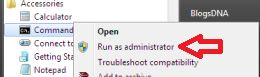
[step 1] With the USB drive connected, open a command prompt with elevated privileges.
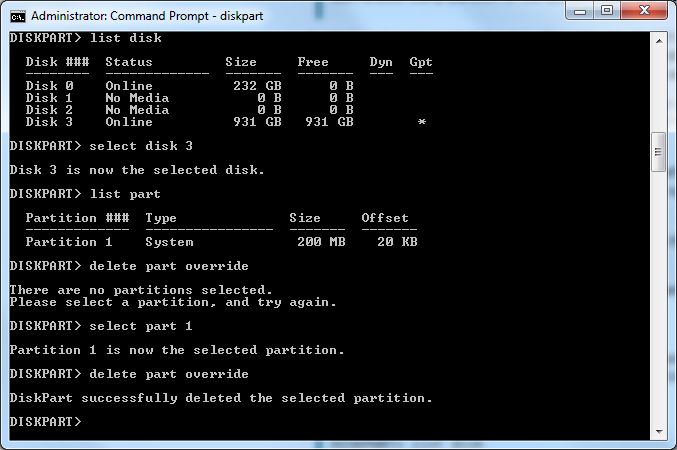
[step 2] Start the disk partition utility by typing diskpart.
[step 3] Type list disk to see all of your connected disks (be sure you’re working on the right disk, if you select the wrong disk you’ll be sorry – see disclaimer). To select a disk type select disk # where # is the disk number you want to delete the EFI partition from.
[step 4] Type select partition # where # is the number of the partition you want to delete.
[step 5] Type delete partition override
That’s it.


Comments
96 responses to “Delete EFI partition in Windows 7”
David, partition override deletes only the efi partition? or everything on the drive?
John,
The partition delete override command deletes an entire partition. The way diskpart works is you first select the disk you want to work on, then the partition you want to work on then finally when you execute commands they will only affect the selected disk and the selected parition on that disk.
If you fail to select a partition to work on, the command delete partition override should not work. It should ask you to select a partition to execute that command on first.
In summary…if you have a disk with three partitions on it, using diskpart to delete each one will require you to select the disk, then select each partition and execute delete parition override on each one one partition at a time.
p.s. partition delete override does not delete the data on the partition. It only deletes the partition information, but the data could still be recovered if the partition table is rebuilt using a recovery tool.
Cheers,
David Vielmetter
Thank you! I had the same predicament going from a Mac to a PC and couldn’t figure out how to get rid of that stupid partition.
sweet! thanks amigo!
David,
BRILLIANT!
I did the same as you. Bought an external USB drive, used it with OS X and then could not access with Windows when I changed my mind for its use. Googled it. Found your web page. Used your method to delete the EFI and data partitions that OS X had created and instantly in the Windows 7 Disk Management Console I had a healthy 1.5TB drive that I could format.
Fantastic tip. Thank you so very much.
Gordon
Thanks for the great tip!
Hey
Super tip just what was needed.
Fantastic Solution! Thanks a ton for sharing!
Brilliant
Just what I needed, first Google result. Perfect explanations. Thanks a lot !
Thanks David!
Clear, concise, and effective. Excellent instructions to a needed fix!
Hi now to access to efi hard drive in windows i connect it
very useful!!!
dear old msdos…
many thanks!
luca
Thanks – worked a treat!
Just like everyone here said: thank you, it worked a treat. Appreciate your support.
Thank you! 😀
I received the following message;
DiskPart has encountered an error; The media is write protected.
See the System Event Log for more information.
Why do I remove the write protection?
Thank You, david..
It works for me.. much appreciated ..:)
David,
This seems as though it would work in Win8 also. Is that the case? I got all the way to the list part and mine had 2, a system, and an unknown. The system was small while the unknown was 465GB. Do I need to remove both part or only the System?
Thanks for the work around. It is most excellent, easy to follow and straight to the point.
Will Rogers
thanks mate.
works for me too.
Thanks. Great information. I indeed initially formatted the HD on my Mac as FAT and then, Windows Server didn’t allow me to use it as backup for what now seems was the EFI partition. EFI partition removed and Windows recognizes the new HD as a place where I can make Backups.
Not fully working yet as I have other problems but I will keep looking – seems Windows doesn’t like that I am selecting to backup a partition that is bigger than 2TB. Go figure.
Thanks again,
Great. Thank you. just what I needed.
Thanks a ton mannnnnn 😀
Thank you very much ! Simple and clean.. Helped me alot !
Thanks it’s save the life of my usb key
😀
Thanks a lot! I deleted my EFI partition without any problem.
Thank you so much! this worked absolutely flawlessly…may consider editing to include that “enter” must be pressed for each command…on the other hand though, it’d be pretty dangerous for someone who didn’t know that to be messing with command prompts!
As many have said before, THANK YOU SO MUCH! I’m working with Win8.1 Pro x64, and the diskpart application worked just as you described under this OS. You have created a straight-to-the-point tutorial, with nothing extraneous to confuse us simple folk 🙂 Thank you again!
Great tip, I struggled until I came across your very informative post
After use this trick does it wipe my data ? 😀
This trick only removes the partition information. It does not wipe the data. Someone using testdisk would be able to recover data stored on disk/partition you removed using this trick unless you formatted the partition afterwards.
Cheers,
David
You should be a part of a contest for one of the greatest blogs on the net.
I am going to highly recommend this web site!
Your the man!
I love it when a plan comes together! Thank you –