I’ve been generally happy with my Seagate Goflex Home NAS device. I purchased the 2TB model at COSTCO a year ago and have been running Acronis backups to it for the past eight months. I have Acronis configured such that incremental backups of all my computers are copied to the NAS six days a week and a full backup image is generated every Sunday. Recently backups on my Livingroom PC started failing in Acronis and after working with Acronis support it was determined that the best course of action would be to re-create the backup job (don’t even get me started on Acronis support).
I re-created the Acronis backup job for my Livingroom PC and ran a full backup, then decided to delete all the previous backups. While trying to delete one of these backups, I ran into an interesting problem with the Seagate Goflex Home NAS. I could delete the file using explorer, but the file would *magically* reappear seconds after I deleted it. After doing this a couple of times it became apparent that the file was stuck somehow.
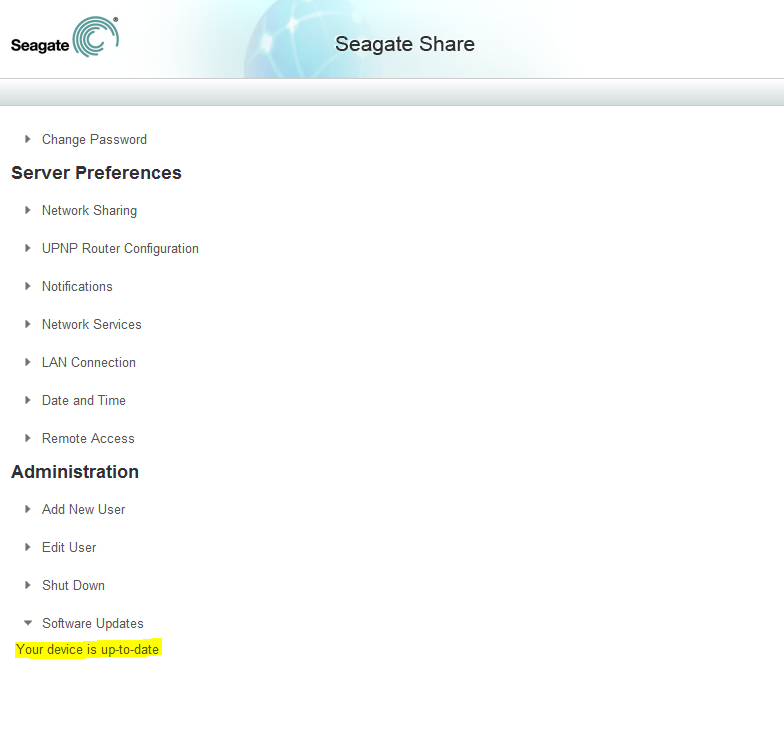
I accessed the Seagate Dashboard and opened the Seagate web preferences window and checked to ensure that the NAS operating system software was up-to-date. It was up-to-date and no errors were logged in this interface whenever I attempted to delete this file using windows Explorer.
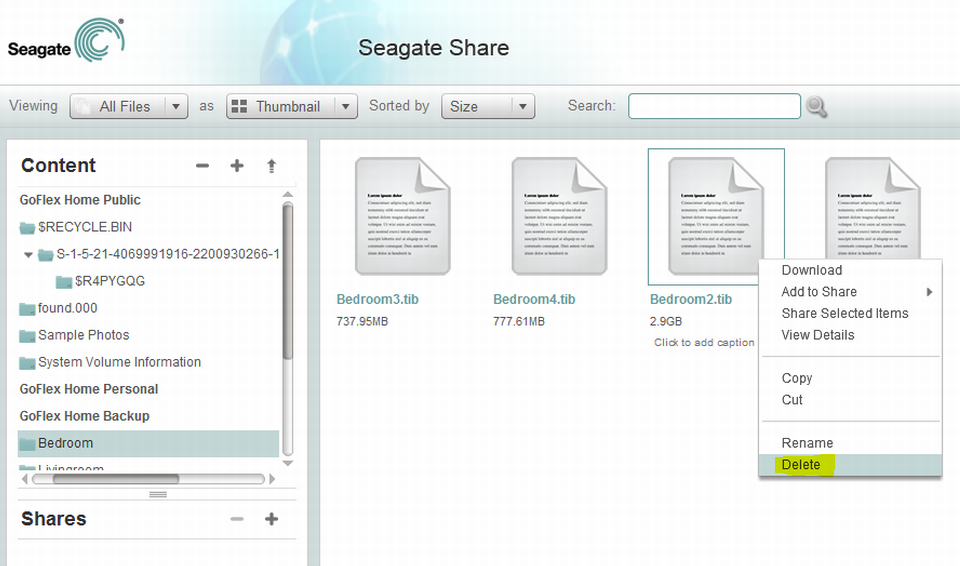
I then accessed the device storage folders using the web based interface and attempted to delete the file this way. When selecting Delete, the system threw a file system error deleting the file.
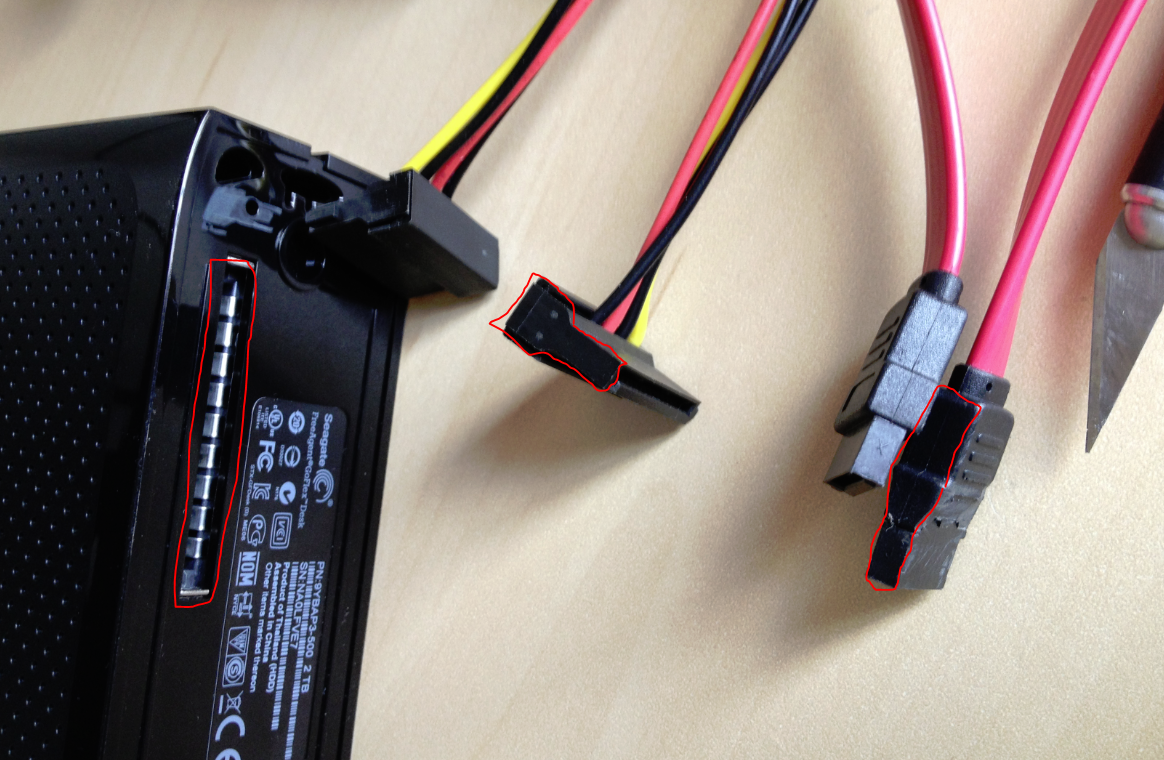
According to the support forums, the only option was to format the entire drive using the web preferences interface, but I did not want to lose all the other data on it. Copying data to and from this drive is extremely slow at 6-10mb/sec. So I ejected the drive from from the base and tried attaching it as a SATA drive to my PC. The idea was to run chkdsk on the drive to see if there were any recoverable file system errors chkdsk could fix. The problem I ran into with this idea is the proprietary drive enclosure. The thick plastic cover prevents most SATA and SATA POWER adapters from reaching the drive SATA connectors:
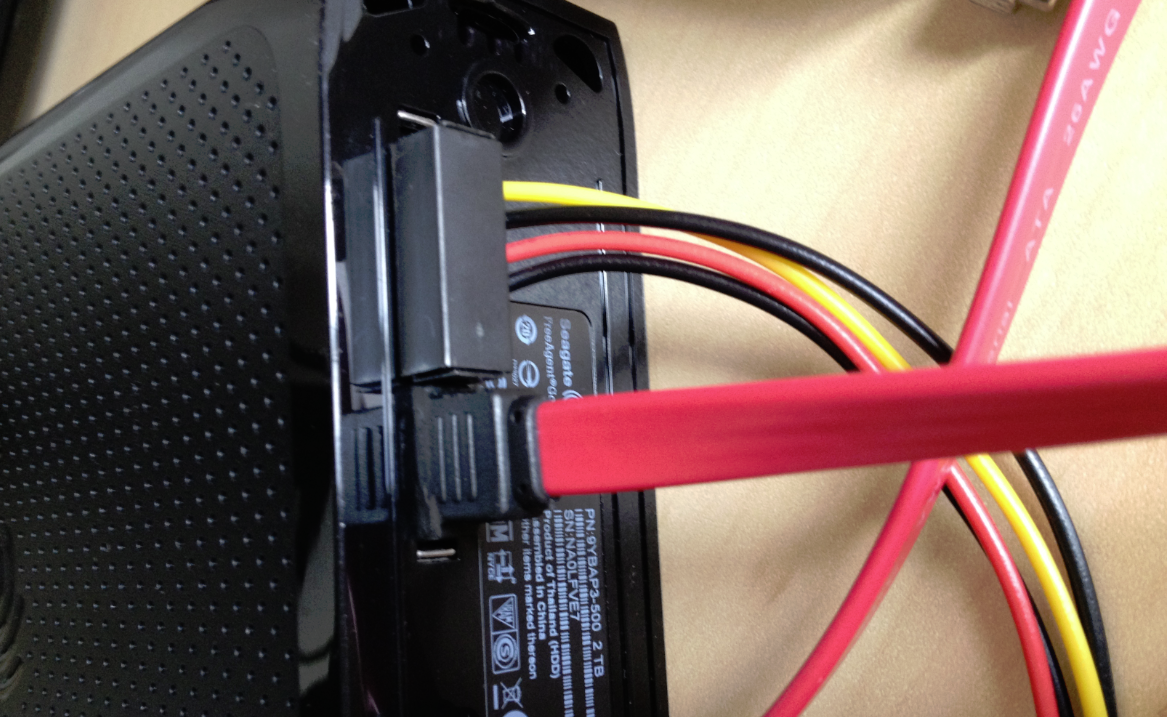
So I had to digg through my box-o-cables (yes every computer geek’s got one) to find some SATA power adapters narrow enough to fit past the plastic enclosure and reach the sata jack on the drive itself. The SATA cable itself needed some trimming work with an exacto knife but that ended up working quite nicely:
Next, I attached this drive to my PC’s motherboard and ran chkdsk on the disk volume which is surprisingly formatted as NTFS file system. Long behold, chkdsk found loads of problems and repaired them without harming the rest of my data. Now my NAS works like new again and I didn’t have to format the whole thing.
That’s it.
Comments
72 responses to “Seagate Goflex Home disk maintenance”
Can’t we connect it using USB to SATA connectors?
Yes you certainly could. If you had a usb-to-sata connector that fits the drive through its enclosure, you could certianly use that instead. As shown in the picture, I had to jerry rig even the standard molex sata power and sata plugs so all the usb-to-sata adapters I had would not fit the drive enclosure.
Hi, I have run chkdsk and the were several corrupted sectors which were fixed but the base still does not recognise the HDD – the disk is spinning so guess the power supply is ok. Also the corrupted sectors(?) were all in the public or shared partition. Any suggestions on further steps would be most helpful. Would plugging the drive in into a laptop, accessing it via segate dashboard help?
Connect drive via sata to notebook and backup any data you can. Then format the drive and put it back in the base. If the drive is still not recognized rma or replacement are your only options.
Hi David,
Desperately need your help. How can I run chkdsk on my NAS drive without the cable? Anyway to recover a lost directory (with 80GB of pics)? Thanks! I sincerely hope Seagate has taken at look at what you are doing and helping you out someway – you sure cannot find this kind of info on their site not a link to yours – which is the least I would expect.
Duke
I made the stupid mistake of trying to copy a folder from my goflex home freeagent NAS on my network, to an external drive connected to USB on the NAS – guess what happened – I go an error “you cannot copy file to itself” and my original directory with about 80 GB of pictures are gone – please, please help. I am not tech savy, I tried several things in vain. I figured out how to eject from the seagate dashboard/preferences but I don’t know how to run chkdsk. I pulled the NAS drive but it has a wired connector to the base. I have it connected to a router and access it via wired and wireless connection from different computers. I just don’t know how to recover the 80 GB of files. I know it’s on the disk and it’s just not accessible as the error message happened instantaneously and the directory was gone. I tried seatools – but that’s not for network drives. I mapped to Windows but chkdsk does not run on network drives. I am stuck , frustrated, mad at myself and would appreciate any help!!! Please!!!
Hi Duke,
First off, there is no guarantee that the fix I’ll recommend will work.
That said, here is what I’d try: remove the drive from the plastic enclosure or find a way to hook it up to your computer via SATA or USB to SATA adapter.
Once connected run testdisk or photorec. Both are free recovery utilities. Search my blog for testdisk to find a tutorial on how to use it.
Otherwise drivesavers can probably recoup data but its expensive.
Most important is that you don’t write any new data to the drive.
Hi David,
Thank you – right now I am waiting for this connector. Will post once I receive it and do the things you are recommending. I have disconnected the drive from the network for now.
http://www.amazon.com/gp/product/B003IT6PHM?psc=1&redirect=true&ref_=oh_aui_detailpage_o00_s00
-Duke
PS: Can’t Seagate put a link to your site atleast for other poor souls who are stuck with their products and run into similar issues?
Hi Dave,
I got the SATA to USB cable today – I connected the cable to the drive (pulled it out of the base) and connected to USB port – my Win 7 however is not recognizing it I don’t hear the drive spinning up even – so much for this experiment waiting for the SATA to USB cable (maybe the cable is busted). Now I will try the SATA drive unless someone knows how to make the SATA to USB cable work on Win 7 (i.e. drivers etc.). Thanks!
David,
thanks for the information. Its very useful. Unfortunately, I am also facing a similar issue but I don’t have a SATA cable. I also use a laptop to connect with the GoFlex home drive. Lastly, I will try to find a usb to Sata connector that allows me to connect to the drive directly, but in its absence do you have a different solution. For instance I can connect to the underlying linux OS as root but FSCK is unavailable and I don’t want to upgrade the linux system on the GoFlex 🙂
Thanks in advance.
Cheers,
Paaras.
Yea, hopefully it’s some standard flav. or microlinux with a published root password somewhere. That’d do it.
I had a flashing “amber” light on the drive the first day I got it. I bought and tried to use this usb-sata adapter – http://www.amazon.com/gp/product/B005B3VO24/ref=oh_details_o02_s00_i00 – to see if I could connect it directly and chkdsk it or reformat it because the base would not recognize the drive (I connected another SATA directly to the base as well as an external usb drive and they both worked with the network interface so I know the NAS part works).
Unfortunately the product I bought ended up being too short to actually connect. Any ideas? Do you think I could cut the adapter to make it longer or would that damage it?
I already tried directly connecting the base to my laptop using the ethernet port as the Seagate forum says it should work, but nothing was recognized so I can’t even access the drive to run chkdsk that way.
Either way, the website I bought it from is exchanging it for a replacement (after I already spent literally 3 hours on hold with Seagate and then was unsuccessful in troubleshooting it with their tech support), but I’d just like to see something come out of my time spent reading forums, on the phone, and spending $20 on the adapter.
Thanks.
Its sad that you cant run chkdsk or that the web interface NAS interface does not have a built in checking tool etc. If you copy files from Linux or Mac systems to it, the permissions get carried over, and prevent you to delete or do too much with the files. Therein lies to the problems of locked files.
I have tried running chkdsk using a mapped drive it cant fix anything.
You can connect directly to the NAS drive base if you use a Crossover Ethernet Cable.
Its supplied cable wont do anything. You need either a router or crossover cable or crossover adaptor to make it work. Then you can get to it after that. The GOFLEX will then show up in Network devices
and also via WEB interface. You can purchase crossover cables and adapters at most computer stores.
Would have been nice if they would have supplied one with the unit.
You don’t need a crossover cable to connect the Goflex Home directly to your PC with ethernet as the port is auto-sensing, but it is still a network connection so you can’t run chkdsk from your PC.
You can use secure shell to connect and run linux commands on the Goflex Home firmware. http://www.openstora.com/wiki/index.php?title=Easy_Root_Access.
And there is no fsck.ntfs so fsck is no use, but you can run usr/sbin/pchkntfs -f /dev/sda1
You are correct. Amazing thing there, you can either hook to router or direct to a PC and it finds it. Makes it so nice as a portable drive. I am not so familiar with Linux BUT I have Linux Mint so I will try this to see if I can get to it to run this, so that I don’t have to disturb it. I am finding it is very sensitive to crashing IF you so much as even slightly bump the drive.
So if they were to build a more stable base/enclosure that would be great. I am even thinking it would be cool if a small cooling fan or ventilation holes were to be added to the HDD casing.
Also another thought is to simply remove the bare drive from the shell to permit hooking it up to your desktop computer for the purposes of defrag or scandisk of the drive. I plan to do that as I have a few folders that are doing the same thing, they refuse to delete.
I was able to do this, but when I tried the pchkntfs -f /dev/sda1 I get a file not found. Oddly a ls-l in the folder shows it is there. I do not understand unix I guess.
There is another pchknhfs.exe however I am not going to try to screw it up. I did do a supposed firmware flash from the seagate website. That seemsed to take using the XXXX codes in a prompt, it made it in I guess not sure how you tell. For the 2.7xx which they are saying that it should cause it to rescan. Well its a 2 step process, reboot once, and you get orange flashing then blue, still gives all access just fine. Then restarted it once more, and then it gives the normal solid orange along with the blue led solid. (Not in that order, normal bootup is to starts orange flashing, then solid blue after about 1 minute, then solid orange about 1 minute after that. So nothing gained, it seems to be some issue with MKV files. Maybe I will try to convert them in place to another format. I don;t get why a certain type of file, causes the folder to be undeletable and also that the folders file keeps re-appearing.
I saw a post about MAC issues with DLNA (whatever that is) and I do have a MAC computer that when I copy files over it seems to cause stuck folder thing as well but only sometimes.
I have to say overall that despite the supposed security risks that I have never seen it hacked into. Who would bother. I turn off all outside access. If I need a file, I have a nice little portable HDD or burn a DVD or flash drive for such purposes.
I am not a linux guru but know my way around the filesystem. Tried the “./pchkntfs -f /dev/sda1” command but it reported…
The device “/dev/sda1” is mounted as “/mnt/eSata ufsd rw,nls=utf8,uid=48,gid=100,fmask=0,dmask=0,force 0 0”
Check is impossible
Now, I believe I need to unmount the system, run the check and then either mount it back or probably reboot and let it handle by itself. Since I am not a linux guru, am a little scared of touching that. If anyone has achieved this successfully, please advice.
Not neccesary. The base will connect and configure automagically using a Standard Ethernet cable. It will automagically do the crossover connection for you. No need to purchase any special cables.
It connects to a router just the same. So it never needs a crossover cable.
I had my original 2TB drive fail in it. I was able to recover SOME data, using Paragon Data Recovery software, and installing the drive as described into a working computer. The other easy option is to simply pry apart the drive housing. Then you can expose the actual hard drive, and remove it form the metal shielding, and attach it to any computer or even using the USB adaptor.
Using the Paragon software I was able to recover lost folders and data right over to my desktop computer. Then I installed the new unformatted blank 1TB hard drive back into the enclosure, place it back on the base power up the GoFlex, and then it will automagically reformat the drive.
Once that is done, acess it using the same username and password, and your back in with it fully working once more.
Then of course the long slow process of putting everything back that used to be on it across the network. But here is a secret.
Allow the drive to be reformatted by the base. Then shutdown the whole system once you have fully accessed it.
You can then proceed to disconnect it from the base, and reattach it to your desktop computer via the SATA interface, and then you can access it from Windows 7-10 and copy files and folders back to the respective folders. Just DONT change the folder structures of course.
Once done, shut down the desktop, and reinstall it back to the GoFlex Base. Reboot the base, and wait a few minutes. Now go and access it on the network.
Woila all your data was copied back and once more accessible.
And of course that was MUCH faster than the slow and not always reliable network methods.
Sadly yes I agree that Seagate SHOULD have provided disk management tools in the dashboard or for that matter just inside of the network web host.
Found my answer in the first post here…
http://forums.seagate.com/t5/GoFlex-Net-GoFlex-Home/copy-never-finishes/td-p/185631/highlight/true/page/2
basically, eject the media from web interface, run the check and the reboot the device, again from web interface (or shell).
Have almost the same problems as everyone else here.
Originally had only 211 MB problem. Reflashed and rebooted many times, tried to perform chkdsk, doesn’t work (connected as second disk per SATA in Windows). Windoze says 346 GB partition and two unformatted. Linux Mint SSH access allowed pchkntfs and found some errors.
Still stuck with this.
If I reformat using the web interface, will it repartition or am I now stuck with only just over 10% of the disk available?
Many thanks
Colin
only one way to find out. Sorry, i never reformatted via the webinterface.
If the drive has Linux Partitions these were not created by the GoFlex BASE.
In order to use the drive you are going to have to remove all partitions from it, and allow the base to recreate the NTFS partitions which should be labelled, GoFlexHome_Public
GoFlexHome_Personal GoGlexHome_Backup and in the root will have several files as well
which are what the Server (Apache) uses to hold the encrypted configuration data.
You can acess and copy into any of the GoFlex folders, but of course to not touch any of the rest of the data or folders.
I found I was able to restore stuff easily this way.
You can do it however across the network using the Shared folders and your main account username and password.
Its just very much slower way to restore a lot of stuff.
Truly since replacing the 3 year old worn out drive I have gotten at least 1 more year of service and expect to get a couple more.
The secret is NOT bumping the unit while in use and putting it into a secure well ventilated area.
I have also given thought to using a rechargable battery or at least place it on a UPS to avoid data corruption. Another advisable idea is to disconnect it from the network when you plan to run chkdsk on the drive, and ALSO wait 15 minutes to allow it to spin down the drive in the base before turning off the base power switch or power supply.
I made the stupid mistake of trying to copy a folder from my goflex home freeagent NAS to an external drive connected to USB – guess what happened – I go an error “you cannot copy file to itself” and my original directory with about 80 GB of pictures are gone – please, please help. I am not tech savy, I tried several things in vain. I figured out how to eject from the seagate dashboard/preferences but I don’t know how to run chkdsk. I pulled the NAS drive but it has a wired connector to the base. I have it connected to a router and access it via wired and wireless connection from different computers. I just don’t know how to recover the 80 GB of files. I know it’s on the disk and it’s just not accessible as the error message happened instantaneously and the directory was gone. I tried seatools – but that’s not for network drives. I mapped to Windows but chkdsk does not run on network drives. I am stuck , frustrated, mad at myself and would appreciate any help!!! Please!!!
It wont even let me do that, It refuses to allow write access to the USB drive I connected to the USB port, which can be used for External Storage.
I may try to just remove all partitions on that drive and try again. It maybe trying to do something odd.
Or perhaps external storage cannot be written to? I hooked it up and Linux showed it had only 920GB of free space. Is there a limitation? Can the GoFlex drive write to external hard drives?
I have a much smaller drive I may try to hook to it and/or reformat it on a windows Machine to split it into 2 drives perhaps.
How come when I directly connected my 3.5″ goflex drive to my mobo with a sata cable and power cable it went up in smoke? 🙁 The reason why tried this is because I wrongly connected a laptop adapter to it. And when I tried the right one it just flashes its led.
Oh, wow. Never heard that one before. Sorry about that. Perhaps the new model of the Goflex drive is wired differently than the one in my article. So you took apart the plastic enclosure of your drive and found standard SATA Power and SATA data connectors, but when you connected them to a standard power supply it blew up your drive? That is interesting and people should take note. My part number Seagate Goflex (the one the article above references) is: 9YBAP1-520.
No they must have done something really wrong, like connected power cables wrong.
Trust me it is just a normal SATA-2 3.5 inch Seagate desktop hard drive, with the familiar L shaped power and data connectors.
If the drive smoked it is either totally defective or as stated hooked up incorrectly.
Just a guess on my part… See my other post. If you connected right to the Goflex unit without removing it from the enclosure, cables may have been sitting on there incorrectly.
second guess would be that your drive was somewhat worse off than mine, Possibly it was on it’s way out anyway and just happened to die while you were attempting to recover it. This would definitely not be the first time I have heard of something like that happening.
I am sorry you lost your drive, but I thank you for sharing this info. I will not risk attempting to connect to the sata enclosure with cables that don’t fit easily. In the future, if I need to run a chkdsk, I will either find cables that fit better or continue to take the extra time to disassemble the enclosure to remove the drive before attempting the repairs.
A thought for you… If your unit is not that old… And you did not discard the fried disk yet… Check the date of manufacture on the disk, Many disks have a three year built in guarantee. Even if the NAS warranty is for less time, you may be able to remove the drive and return for replacement. Seagate is great about this. I have removed a drive with a three year warranty from a USB enclosure to find the drive was still a warranty item, even thought the USB/drive unit warranty had expired. It’s worth a shot. I know it won’t help you with lost data but at least you can get your NAS back. Hope you were backed up. I run a USB drive on the port from the Goflex and create a backup with the Mirrorfolder program run from a server. Works well. I run Mirrorfolder in real time mirror mode so data is always current. Of course the server running Mirrorfolder has to be up all the time to make sure the data stays synchronized.
Good Luck!
David, don’t feel too bad about xvanquish’s problem. It was nothing to do with your advice and The GoFlex drives are stock standard Seagate barracuda SATA drives.
xvanquish had already blown up the drive by connecting a laptop power supply instead of the standard 12V2A before trying your excellent advice, according to his own post.
First off it uses 5 volts and not 12 volts, so that alone was a major mistake. I have an external USB type data adaptor which has 3 interfaces, 2 are IDE and one is SATA with a SATA cable.
Then it comes with a IDE type and SATA type power adaptor which looks like a laptop power supply but has both 12 and 5 V output to allow connecting to any type of hard drives. But you cannot jury rig things. I think had they done stuff properly nothing would have resulted in damaging the drive.
Sorry but dont hook up stuff in haste, always use precautions.
Just had a similar problem. When attempting transfers of large files to my 2TB Goflex Home the transfer speed would gradually degrade and fail 1/4 to 1/2 way through the file, Tried from an XP, 7 Ultimate and Windows 8 machine, with the same result on all. Worked for days tweaking and tuning to no good end. Thought it might be the NAS system. I decided to rescue the drive. I attached the drive via sata cables to an old XP file server. Immediately, on boot-up, I received a message stating one of your disks needs checking, It was the newly attached Seagate drive from the NAS. A “ton” of errors were corrected. Subsequently ran a chkdsk and the drive came up clean.
I decided to try the drive in the Goflex again. I was able to copy a 3gb file successfully to the Goflex without errors or degradation of speed. ( I copied from a windows 8 machine which graphs speed of the transfer.
The only caveat I would offer is that the connection on the Goflex drive is not very accepting of thick Sata connectors. I used a standard sata power connector from the power supply and a gigaware data cable. Neither fit well into the Goflex enclosure. I disassembled the enclosure and removed the drive to ensure solid connections to the drive while performing the check disk.
Luckily, the Goflex enclosure snapped apart rather easily. I am a network engineer and my strengths are in hardware and networking. If I was a programmer, I would certainly be working on a suite of tools to repair drives across network connections.
I wish I had found this thread a few days ago… I could have saved a great deal of time and aggravation!
As many have explored the Apache from the network, you can go into its shell, and such. However since it is running from a flash rom based system, unless you are knowledged in Apache Server software then were pretty much at the Mercy of Seagate which no longer sells this drive.
There is an article someplace discussing how to Access the Apache Server from the backdoor using your master username, password, and the serial number of the base unit.
Once in that backdoor I have tried things like fsck and other linux terms but was never able to perform them, just kept getting permission denied. ‘
If you put in a drive to it that you could use as a practice you probably could figure out how to tunnel into the network interface, and link to the internal software and figure out ways to go beyond that.
I tried but did not want to cause more damage than good.
The time spent trying to figure it out was more than to just do the physical work.
One thing is that when Apple computers access it they keep creating useless .AppleDouble
folders which I would like to remove but I know they are just ghost or recycle bin copies. And of course windows puts its lovely .thumbnails and .recycled
Its stupid that Seagate should have filtered out invalid filenames and folders but then it would not be a true backup I suppose.
Thanks very much for this advice. I had noticed that over time, my drive would sporadically have issues copying files. Sometimes it would start out fast and fall right off to the point where it was painfully slow.. or just freeze altogether. This cleared it up.
I had already taken the enclosure completely apart before, so I found the method of completely extracting the HDD a little better. That and I have one of those external usb sata/pata drive readers for computer maintenance to just pop the drive directly into.
Cheers.
I found that the Anker USB 3.0 to SATA 3ft Converter Adapter Cable (http://smile.amazon.com/gp/product/B005B3VO24/) works swimmingly for this!
Thank you David and everyone for this helpful tip on scanning my GoFlex Home.
I have a Goflex Home 3TB drive that has been very slow with file transfers. I has 3 partitions approximately the same size. I connected it to my motherboard successfully, but in Ubuntu 12.04 I get an error stating that partition is misaligned by 512 bytes. It also only shows one partition of 375 MB (type “unknown”) with 2.6 TB Free. Under Window 7 it shows 3 partitions, 349 GB “Raw”, 1698 GB “Unallocated”, and 746 GB “Unallocated”. How can I run chkdsk on this drive without destroying its contents? Any insights would be appreciated.
Paul
Are you able to connect to the goflex’s UI via web browser? If so, I’d go and check what your file system is formatted as on the untit. You can see that in Preferences->storage device(s) within the web UI. When I connected mine via SATA, i left the RAW partitions alone, but my primary partition showed formatted as NTFS not unallocated and I know chkdsk works on NTFS, so i ran it. If you’re using the NAS in a UNIX/Linux environment the partitions may be formatted as eXT2 and that may be why Windows sees it as Unallocated. I wouldn’t run chkdsk on eXT2 partitions. You may want to run fsck on those instead.
Cheers,
David
I have the 2tb GoFlex home. Had file error issues as mention above and removed drive from enclosure and attached directly via SATA to windows 7 machine. Removed all the data and zero filled the drive the Seagates own DOS tools. Now back in the enclosure and attached to the dock the system will not recognize there is a drive in it. Is it possible I need to remove the drive again, attach it back to my PC and format it before it will recognize the drive again?
Again help in this matter will be greatly appreciated!
Nate
Nate,
Have you tried formatting the drive using the Seagate GoFlex utility from within the web ui after reconnecting the drive? Maybe give that a try.
I have a GoFlex Home 2TB drive out of the enclosure. Seagate said the drive was gone and it is out of warrantee. Can I replace the drive with another or does it need to be specifically configured for GoFlex? Tech alluded to possible firmware problems. I noticed on the base of the plastic enclosure referred to it as a FreeAgent GoFlex Desk. Seems like an external drive plugged into a NAS base. Any thoughts about buying another generic drive and putting it in the enclosure?
Hi John B,
While theoretically that should be possible (replacing the seagate drive with a another OEM drive) since the brains of the operation are in the base, there are a number of reasons this could also fail:
1. The base may look for a Seagate manufactured drive (i.e. seagate serial number, etc) before being able to write to the drive. Since the base is a black box and we don’t know how it operates, there’s a chance this may be the case.
2. The base may reject drives manufactured by other vendors.
3. The base may only accept drives with a certain size.
So, if you have another drive lying around, it’s easy enough to see if it’ll work. If you are planning on purchasing the drive specifically for this purpose and don’t think you’ll be able to return it if this doesn’t work out, then i’d steer clear.
Cheers,
David
My advice is to remove all partions from the drive using if Linux use Gparted.
In Windows use System Management and Storage to remove them all.
Now once you place the drive back into the base give it at least 5 minutes so that it can self format the drive, and you will need to install the Seagate Dashboard into a Windows machine connected to it (either on your router or directly).
Of course you will wind up as if you had just purchased the GoFlex drive and everything blank.
It will transfer over the dashboard software to respective folder which is copied from the base onto the drive. Also it does want internet access, since you can remotely access it from SeagateShares.com
Yes I have a Maxtor drive in my replacement and it works fine. It is NOT brand specific or need any sort of special formatting. Just that it needs to be unformatted to make it work.
Thanks, David.
I talked to Seagate a few times and decided to forego the replacement drive. The tech stepped me through updating the firmware for the base and was able to reconnect to the network, albeit without a drive. I then had a spare FreeAgent Go drive which I plugged into the USB port on the base. My PC found the external drive along with 3 default (and empty) GoFlex folders that are obviously part of the base firmware/OS. Bottom line: I can plug a external USB drive into the base and continue to some NAS.
John
Hi David,
Your experiment and advice came in handy for me. I have a 2 TB model no STAM2000100. I was able to go in my box-o-cables and find some of em. After a little trimming on the sides, I was able to connect the ejected harddisk in its enclosure box to my old Sarotech external 3.5 USB/Esata enclosure and ran CHKDSK in Windows 7. It did find a couple of benign error and fixed them. Was a pleasure to know that the internal file system is NTFS, so I can easily fix it using Windows, without rebooting in Ubuntu. Based on it I assume that the NTFS read/write support is built in stock firmware by Seagate and would also be applicable for any external USB drive connected to the NAS enclosure via a single USB port in the NAS base. Very unlike my earlier and old WD MyBook World (Blue Ring) which was all the way ext3 inside and out, and caused me a lot of pain earlier, lying around with me however, as it proved to be my first embedded device enclosure on which I learned the SSH access and optware package installation.
Did think about loading an alternative firmware on GF Home, Archlinux or some other NAS OS, but wasnt sure about it being as easy and (point an click ) as the stock firmware is. Any suggestions ?
Just an observation, that when operating normally the Seagate GF Home after the boot up process is complete shows the upper LED as green and lower as white (in front of the NAS base). My NAS is kept on 24/7 usually, sometime my NAS randomly makes a squeaking noise (not like the harddisk clicks of death) and the front upper LED goes blinking orange , remaining in this state for a while the NAS reboots itself. I am yet to figure out what maybe the reason and possible fix to it.
Can you help or offer your advice on it.
Thanks.
[…] Seagate Goflex Home disk maintenance | David … – I’ve been generally happy with my Seagate Goflex Home NAS device. I purchased the 2TB model at COSTCO a year ago and have been running Acronis backups to it for the …… […]
I have been using the GoGlex Home 2TB model for last 4 years now. The performance of the drive sucked initially but soon figured that it is linux based and allows root access via ssh to fix the disk problems as well as allows to start dlna service. Now, it is recognized over my network with dlna streaming devices and the NAS performance has drastically improved.
To fix the hdd issues..
1) login to using putty or so over ssh with user id admin_hipserv2_seagateplug_AAAA-BBBB-CCCC-DDDD (where AAAA-BBBB-CCCC-DDDD is your device serial no)
2) Followed by
$ sudo -E -s (no root passwd set by default)
3) Now open NAS interface in browser and login with admin user; Then eject the disk under storage disk option under preferences…..
4) Followed by
# /usr/sbin/pchkntfs -f -a –showminors –verbose /dev/sda1
I follow these steps every 6-8 months for preventive maintenance and performance upkeep. That said, there are always inherent risks in meddling with filesystem in this manner – like irrecoverable loss of data. Hence, do it at your own risk. Certainly do not do this if you’re facing no trouble with the NAS.
Hi,
I think my goflex harddrive was in a worse state (couldn’t access it at all, only showed 211 mb on the mapped network drive). I followed instructions posted here and was linked to your site.
http://community.seagate.com/cso_community_zones?id=90630000000i2kgAAA
https://davidvielmetter.com/tricks/seagate-goflex-home-disk-maintenance/
I took the harddrive out of its enclosure and placed it into a PC, which showed 2tb total with 1tb used (correct) and some folders, but when I click into the folder it’s either empty or just freezes. I tried running chkdsk /r /f on the goflex home, but it stops itself during stage 2, posting something like “Error detected in index $I30 for file 5”. Afterwards, the harddrive becomes a RAW format, which scared me, but after I unplugged it and plugged it back in, it goes back to its original NTFS broken state.
Just wondering if you have any advice or tips on what to try next? Thanks!
Brian
With the hard drive connected via SATA to your PC, run testdisk. I have an article on how to use it to recover data here:
https://davidvielmetter.com/tricks/recover-data-from-a-damaged-drive/
If anything is recoverable from the drive, then this is the best software to do it. It’s free. If it cannot recover the data, then you’ll have to ship it to a professional recovery place.
Cheers,
David
Hi David,
I have 4 of the Seagate 3TB GoFlex Home NAS drives. I am thinking of buying a NAS enclosure such as a QNAP or Synology and combining all the drives into the one enclosure running as JBODS.
Before I go & spend big bucks on a 6 or 8 bay enclosure, are you aware of any issues removing the Seagate drives from their enclosure? I understand that they run on EXT 3 or 4 format & I’m not concerned about losing any data off them as I have backups. ****Only concerned about spending big money on a nice enclosure & not having the drives work***
Also compatibility with a QNAP https://www.synology.com/en-global/products/DS1815+
or Synology https://www.qnap.com/i/useng/product/model.php?II=24
enclosure. I know that these 2 brands have compatibility lists, however I doubt that since these 3TB drives are a few years old, that they would have been tested. Do you forsee any problems using the Seagate drives in either brand of ensclosure?
Thanks in advance for any advice you can provide 🙂
Tim
Tim,
Neither Synology or QNAP NAS appliances are picky about the types of drives they take. I’ve had customers mix and match manufacturers and even drive sizes in their QNAP NAS (i don’t recommend mixing different size drives). Lately the most popular NAS drives (and the cheapest) seem to be Western Digital Red label, but you could certainly recycle 3TB drives from seagate goflex enclosures. Just be aware that you’ll have to fully remove the drives from their enclosure before you can add them to the NAS. I have used both Seagate and Western digital in my NAS and both work fine. I have now finally settled on all HGST brand because all my Seagate 3TB drives failed within 3 years. Just put them in a RAID 5 array and keep one drive as a hot-spare. That way if one fails, you don’t have to scramble to get a new drive ordered.
Hope it helps.
David
Hi David,
Thanks for taking the time to respond, hopefully I won’t have too many issues 🙂
I do have a mixture of drives of different sizes (all Seagate) GoFlex Home, GoFlex Desk, FreeAgent & Backup Plus lol.
The main issue where I think the GoFlex Home drives might be slightly different than the rest of the range is that they are already a “NAS” drive with a Linux OS running inside the base. I thought I read somewhere (I can’t remember where) that removing the drives from the enclosure rendered them useless. I just hope after spending about $1000 on a NAS box, I don’t have to replace 4 3TB HDD’s. Do you have (or know anyone) with experience removing Seagate GoFlex Home 3TB drives from their enclosures & getting them to work?
RAID5 would be nice, but if my memory serves me correctly, if I have different sized drives, the other drives will only utilize the same amount of space as the smallest drive in the array yes?
Cheers & thanks again 🙂
Tim
For some drives larger than 2TB, this technique may not work. In order to address such large drives, a different partition table called GPT is commonly used, which allows data to be stored in 4KB blocks, instead of 512B as has been used historically. However, legacy operating systems like windows XP cannot read GPT partition tables. In order to maintain compatibility, Seagate, in its infinite wisdom, decided to store data as if it were using 4KB blocks, so as to address the larger drive, but stick with old MBR partitioning and 512B blocks at the disk level. In order to do so, the USB disk controller in the base applies the conversion from 4KB blocks to 512B blocks. As a result, all 2TB+ can be addressed, even on legacy operating systems like windows. For more information the following link may be helpful: http://www.everythingusb.com/seagate-goflex-desk-external-hard-drive-21441.html
This gives rise to a problem, however. If you remove the drive from the dock and plug it in via SATA. The partitions will not look right, and the data will not be accessible. In my particular case, I have a 3TB drive, and just like Paul M. commented above, when connected via SATA my 2.794TiB partition was reported as 349.3GiB. Note that 512B * 8 = 4KB, and 349GiB * 8 = 2.79TB. So clearly this issue stems from 4KB to 512B conversion applied in the usb dock.
In my case, the usb dock seemed to have failed, as I was no longer able to access the drive via the dock, but there were no errors on the drive when connected via SATA. I just couldn’t access the files due to the aforementioned issue. I needed to recover those files. My goal therefore was not to fix the drive, but simply to recover the data. Below I’ll describe the process I was able to use to recover my data. No guarantee it will work for others, but it worked for me.
First thing you ought to do is use ddrescue to make an image of the disk. That way, if things go south, you still have all of the original data, or at least all that you could read from the drive. Next, use testdisk, and select the disk that you want to recover. Then select “EFI GPT.” Next select “Geometry” and type in 4096. Then “Analyse” and “Quick Search.” Hopefully at this point, it will have found your partition. You can then list your files, and copy them off the drive. I received an error and was not able to write the GPT partition table and use the disk as normal, but I was able to copy the files off the disk using the facilities in testdisk.
Hopefully this short guide can be useful to someone else with similar circumstances as me, especially since there isn’t much information online for how to recover data from a drive with such strange circumstances (thanks Seagate…).
Problem :- Goflex Home Nas is not detected on LAN network i.e. Light is blinking green for 2 minutes and thereafter turn blinking Amber
Solution :- I had faced above problem in last week and my 2TB nas was not getting connected to mu home network, after 3-4 days searching the same problem over net but no proper solution found then, I gone though seagate troubleshoot and found the solution as below
Press and hold reset button with pin for about 10 seconds or till the bottom light glows white the release the button. Here no data will be erased or loss only sign in and setting will be set to factory default. then you can access the drive as if first boot and wola your seagate goflex nas is at your service again….
@Bryan- I think you’re confusing the GoFlex Home and the GoFlex Desk. The Seagate USB-SATA bridge board changes the logical sector size to 4096 bytes with drives larger than 2TB. So you can’t take a 3TB drive from a GoFlex Home and hook it up with USB using a GoFlex Desk base, but David’s advice on connecting with SATA is still valid.
It’s only the Seagate USB-SATA board which changes the logical sector size.
It is possible to reformat a 3TB drive without removing it from the GoFlex Home base using SSH.
Login and become root as described in earlier posts. Then ;
bash-3.2# /sbin/parted /dev/sda
(parted) mklabel gpt
(parted) unit TB
(parted) mkpart primary ntfs 0TB 3.0TB
Hi Kevin, very useful information, thank you.
I’m really struggling with my GoFlex Home 3TB. I’m trying to back up my Mac to it using Time Machine and also my 2 x PCs to it using the Seagate memeo software. It’s never really worked very well so I called Seagate support they suggested creating different user accounts for each computer. So I did that but I’m not able to delete the existing data. A real mess so I just want to format and start from scratch with a clean slate and three new users. So . . . format the disk sounds obvious solution.
HOWEVER Because it’s the 3TB version it can’t be formatted via the web interface. So say Seagate support and in addition that box is greyed out so they are right. Some questions is I may
1. Would the SATA connection direct to my PC or Mac (whichever is easier) work with the 3 TB version?
2. Which format should I use?
3. Should I partition?
4. Should I abandon using Time Machine on a NAS because some forums say only bad things happen if you ever need to restore (Apple wants you to use their time capsule of course)
BTW interestingly the the 3TB unit itself is labelled as a Goflex Desk, it’s only the base unit which turns the complete assembly into a Goflex Home.
Many thanks in advance
Steve H
Hi Kevin,
1. Yes sure. I don’t see why not. If your PC is windows 7 or later you should have no problems using a 3TB drive connected via SATA.
2. If you’re using windows, I’d format NTFS. If you’re using Mac i’d format EXT2.
3. I don’t see any reason to partition an external drive.
4. Time machine on the NAS is run from the base on the Goflex. Once you remove the drive, and attach it via SATA to a PC or Mac you can do it it whatever you want. If you connect the drive to a mac and format it ext2 you can certainly use the hard drive as a time capsule for time machine.
David.
One of the main problems with the Goflex home is the the drive that comes with it. It is just an ordinary desktop HDD, and not a NAS disk. I discovered this when I got problems with the disk after using it less than a year.
I still had warranty and the company I bought it from just agreed to send me a replacement drive. At first they wanted to send me an identical seagate desktop drive, but after some arguments they agreed to send me a 3TB NAS disk instead. These NAS drives are said to be much more reliable and hopefully this disk will last much longer.
I did keep that old 3TB desktop drive, so now it serves as a drive for temporary files on my windows pc. It did work ok after reformatting it, but it is not reliable, at times it gets unavailable and will only re-apear after a reboot.
Anyone thinking of re-using the disk from the Goflex Home in a NAS environment, just have in mind that this disk probably will have a short lifespan. If you want to use this disk anywhere else it will probably be better to use it in a desktop pc as a second disk, or in an external usb cabinet etc.
If the drive is unreliable i wouldn’t use it in any environment. Trash it, move on and get a new drive. For the cost of SATA disks these days it would be foolish to put a failing drive or a partially failed drive into a NAS as part of an array.
that’s my two cents.
Yes, seagate ships some subpar drives. But the goflex line is a home use product line, and the drives are cheap so I don’t expect much. I’ve had my goflex for 5 years and haven’t had any issues after the initial problems. That said, if I had had continual problems with it, i would have cut my losses and gotten another drive from HGST with a better track record than Seagate and called it a day.
hi
im lost
I just had my laptop refreshed back to original win8
because my key board quit working
found out its a hard ware problem
anyways I backed up my files to my portable go flex first
now I want to put my computer files back on the laptop from the go flex
and I don’t have a clue
please help
sue
I, too, was extremely happy with the GoFlex Home which I was using at my store for Acronis backups of the workstations and main server……until our Credit Card Merchant insisted on PCI compliance. Our network failed the vulnerability scan because of OpenSSH with a version of less than 4.4 on Port 22.
I have scoured Seagate’s support section, and I have not been able to find a way to correct the problem. All firmware and software are up to date. Does anybody know how to upgrade the OpenSSH?
Wayne
I have an old 2TB Seagate goflex home NAS
I want to wipe the drive clean.
Is this possible?
as this is a network drive wipe-r-clean type software does not see it
With a 2TB drive you should be able to format it in the web interface under Preferences>Storage Device(s).
If that doesn’t work David’s article shows you how to connect the drive as a local drive so you can use Windows software to format the drive.
If you don’t have a desktop PC then go to http://goflexhome.blogspot.com.au/ for tips on formatting using the GoFlex Home’s own Linux operating system.
HI David,
I have been struggling with this problem for a while and really hoping that I can tap on your expertise to help me out (Seagate support is not very helpful).
I have a 3TB GoFlex Home. A few years ago, the dock failed and I bought a new one. The new one has also failed now. This is my wife’s photo storage drive and I have about 1.5TB of pics on it. It’s backed up so I can recover the contents but that will take a very long time.
I have a SATA to USB cable. I was able to remove the drive from its housing and connect it to my laptop. When I connect it, an orange light on the SATA side of the cable comes on. On the laptop, I see that the drive has a letter assigned to it. However, when I double click on the drive, I get a message saying “Please Insert a Disk into (D:)”.
It seens to me that the physical disk is getting connected to the laptop but for some reason, the contents cannot be read.
– If I right click on the drive and go into proprties, it shows 0 bytes used space and 0 bytes free space.
– If I try to do a disk check I get an error saying Disk Check cannot be done becaus Windows cannot access the disk.
– The Hardware tab shows that there is an ASMT 2135 USB DEvice attached and device status says this device is working properly.
– I tried the Update Driver option but it says the driver is up to date (driver date 6/21/2006, version 10.0.14393.0)
I am quite stumped as to what to do. Any guidance you provide will be very appreciated.
Thanks!
The drive firmware translates the 4096 byte sector size to 512 byte for software compatibility, so if you connect it directly with SATA it will show 512 byte physical sectors.
Many SATA to USB bridge chips reverse this to expose the physical 4096 byte sector size. This enables drives larger than 2TB to be used with Windows XP but means that a drive partitioned and formatted with a SATA connection can’t be accessed when connected by USB.
See how the drive shows up in Disk Management (not device manager, which will just show the USB device). Most likely it will show as RAW filesystem because the partition table set with 512 byte sectors means the NTFS MFT is in a different place with 4096 byte sectors.
Use Davids advice to connect directly with SATA.
As an aside, it is unusual for the dock hardware to fail before the drive since it is solid state.
What’s more common is for the firmware to develop faults which stop the device working. The dock firmware can be reinstalled from a USB stick back to factory status without affecting the data on the drive
I recently bought the 1TB model. The first thing that I did was open the case, remove the 1TB Seagate drive, and inserted a 4TB Western Digital drive. My 4TB drive is in GPT format with 512 byte sectors preserved. I have it partitioned into 8 partitions and 7 of them show up as external storage. I use Windows XP Pro SP3 and this thing makes a great file server.
I have failed 2GB network GoFlex, can I get new 4GB drive pop it in the case and then format it using the seagate utility or it will work only with 2GB drive?
Thanks
Hi brosmith,
That’s a good question. Only one way to find out. It may be that the firmware in the base is hard coded for a 2TB partition, but the only way to find out would be to try it.
Good luck,
David.
Thanks for the fast reply!
You won’t be able to format a drive larger than 2TB using the Seagate Utility. It’s not a restriction in the firmware, which is just a version of RedHat Linux, it’s just how the Seagate Utility was built.
Instructions on how to format a drive larger than 2TB can be found at http://goflexhome.blogspot.com.au/
Thanks for the update and for sharing.
David
David,
Looks like I’m in the same boat as the rest of you guys. One day, access to my drive started to slow down, then eventually my mapped drives would disappear. I would reboot the devices (based on Seagate’s troubleshooting) then eventually get access to my mapped drives again. I copied about a 3rd of my data off before I couldn’t get my mapped drives to show up again. I even did the factory reset Seagate suggested. Eventually, all that showed up were the 211Mb drives (Public, Backup, Personal) with nothing on them. I went through your troubleshooting steps outlined here (http://goflexhome.blogspot.com/2015/11/fixing-211mb-issue.html), but I couldn’t run any of the commands because the base didn’t detect any drives while it was connected. The web interface would show the drive as “safe to eject”.
I ditched trying to work on the drive from the GoFlex base and connected via USB to SATA (Anker). Initially I tried connecting the drive to a Linux Laptop to run some of the other mount and drive checking utilities, but nothing would ever be detected by Linux. I connected to Windows 7, and finally got the prompt to format after a few reboots of the computer and disconnects of the drive. I tried to run Chkdsk from both the GUI and Admin Command Prompt. Both wanted me to format because the data was RAW. I searched around for a few tools to do data recovery and settled on EaseUS. I’m in the process of doing the recovery using EaseUS Data Recovery Wizard. It looks like its working by using a the deep scan. I can see files and so forth, so I’m pretty confident that I will be able to recover the data. The biggest problem is that the files aren’t showing up in a data structure. They are being categorized by file type, with generic names. I’ll settle for at least getting all of my data back, then having to go through sorting it all out, but do you have any recommendations on how to get the file structure working again?
The drive shows up as RAW with 4 Lost Partitions. In Windows, all I see is Drive D:, with 0 bytes used and 0 bytes free. I’ve scanned it with several recovery tools and it looks like the partitions are all there, but lost. I saw someone mention formatting the drive from the Seagate Web Gui, but the Seagate Base didn’t even detect a drive. Any ideas?
RESOLVED!!!
ALRIGHT GUYS!!!! QUICK UPDATE. Bottom line, don’t waste money on any data recovery programs. TestDisk is all you need. http://www.cgsecurity.org/wiki/TestDisk_Step_By_Step
It looks like the Seagate GoFlex Drive can have multiple issues, however, my issue was that the drive showed up as RAW data when I tried to connect it via USB to SATA adapter. There is a lot of good advice above, but this link helped me out the most. http://html5.litten.com/updated-how-to-fix-external-disk-drive-suddenly-became-raw/
Full disclosure, I did purchase EaseUS before trying TestDisk and was able to recover some data, but the data showed up out of order, without any original file names or meta data to the files. I’m not even sure how much it was able to save, but there was a lot of stuff and would have taken months to sort it all out. It recovered a lot of files that I don’t even care about and also made a lot of duplicates of a single file. Example would be an album cover jpeg showed up like 10 times along with 10 thumbprints of the image…. anyhow, don’t waste your money on any other program and try test TestDisk first… Now, back to my recovery.
The biggest thing that threw me off was that TestDisk was telling me that there was an HPFS/NTFS partition detected. So, I did quick Scans and Deep scans based on the Intel file structure. It would take on average 9 hours to run the Quick Scan, and then another 12 hours to run the Deep scan. In the end, it would just find a bunch of Linux partitions, and couldn’t display any files. After going through that process to get literally nothing out of it, I ran PhotoRec (installed with TestDisk). PhotoRec ran for 30+ hours. Yes 30+ hours. When I stopped it, it didn’t show any sign of even being close to finished. The time remaining counter would vary from 16 hours, to 40 hours to 90 Hours left. The other thing that freaked me out was it said Pass 1, like it was going to do multiple passes.
While PhotoRec was running, I did some additional research and came across an article that said something about the 3TB GoFlex Drives being formatted as GPT. I can’t even find the reference article at this point, but I stopped PhotoRec, started up TestDisk again, and Analyzed with the EFI / GPT scan. It presented a few errors, but I performed the Quick Scan and was able to see a “GO FLEX” partition. I then did the Deep scan, and literally in under a minute was able to see my entire folder structure. I copied critical folders over (Pictures, work and personal items) and left with some video files that were lower on my priority list, but the bulk of my data. So far, no errors have been reported during the transfer of data. I did notice that a few pictures can’t be viewed, but I can live with that.
Bottom Line: Follow everyone’s and advice above and do not WRITE ANYTHING to your drive until you are seeing your files. I was almost tempted to just write the NTFS file structure and load it back into my GoFlex Home base since I got a lot of data through PhotoRec and EaseUS. However, as I said before, these programs feel like a last ditch effort to get your files back. Use Test Disk with the EFI / GPT scan if you have a 3TB drive that suddenly stopped working, and don’t waste money on any other tools. Hope this helps someone out there!
Thanks for sharing Agustin
I have noticed you don’t monetize your website, don’t waste your traffic,
you can earn extra cash every month because you’ve got high quality content.
If you want to know how to make extra bucks, search for:
Boorfe’s tips best adsense alternative